Reading a failed generation
What to do when a generation fails, and how to find the cause.
When a generation fails, SimpliGen shows the reason on the job in the Queue. Start there.
First steps
- Click the Queue button on the right rail to open the Queue drawer, then find the failed job under "Needs attention".
- Read the error message shown on the card. It usually points at the cause.
- Try the matching fix below.
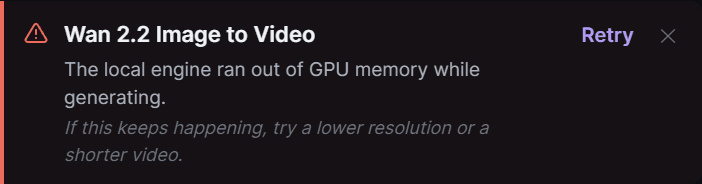
Common causes and fixes
Out of memory, or stuck near the end (local video). The GPU ran out of memory, or the final step fell back to the CPU. Use a lower resolution or shorter clip, or generate in the cloud. See Out of memory or stuck generations.
A model or dependency is missing or broken (local). Click the Local Engine item on the rail's bottom system strip, choose "Manage engine", and use "Reinstall Dependencies" on the affected pack, or reinstall the preset's models. See Engine install problems.
Network or cloud error. Check your connection and try again. If your cloud session dropped, reconnect. See Managing your cloud connection.
Invalid input. For example a value the model does not accept. Reset the setting in question to its default and regenerate.
Cloud failures are refunded
If a cloud generation fails or produces nothing, the credits are refunded automatically. If you were charged for a result you never received, contact support on Discord.
Still stuck
If the error is unclear or keeps happening, export your logs from Settings and share them with support on Discord. The logs contain the detail needed to diagnose it.